Introduction
PowerApps CodeApps has been Generally Available since February 2026. Having spent the last few weeks testing integrations and building real-world projections, I’ve seen firsthand where it shines and where the critics get it wrong.
Before you get swayed by pessimistic articles or developers claiming “you don’t need it,” I wanted to share my insights to help you make up your own mind. To do that, I am launching a new series: “Hands-on CodeApps.”
In this first article, we will:
- Demystify the philosophy behind CodeApps: Why did Microsoft launch this, and what problem does it actually solve ?
- Cut through the noise: Addressing common developer misconceptions.
- Set the stage: Preparing you for the following articles, where we will dive deep into building modern, high-performance UI/WebApps.
Don’t just take the community’s word for it… let’s look at the tool/concept and the use cases scenario together.
For lack of a better term, I interchangeably use words like “tools” or “paradigm” to describe the methods, technologies, and products used to build things differently. This could refer to a programming language, a build tool, a library, a framework, classic WebApps, PowerApps, and so on.
What is CodeApps
Most people, when asked what Power Apps CodeApps actually is, don’t have a clear answer. They often resort to generalities, claiming things like “it is here to replace Canvas Apps” or “it is basically the same thing as a Web Resource.”
Let’s pause and make that make sense. Since when were Canvas Apps and Web Resources even remotely similar, or used in the same context ? One is a standalone, low-code interface builder for mobile Apps, while the other is a legacy method for injecting custom logic or UI into Model Driven or D365 Apps. Comparing them is like comparing a paintbrush to a specialized surgical tool. This confusion perfectly illustrates why we need to demystify the true nature of CodeApps.
But what really is CodeApps ?
CodeApps is fundamentally a new paradigm that allows you to build custom modern web applications while leveraging the full capabilities of Power Apps and the Power Platform.
When I talk about custom web apps, I am referring to the classic applications which in the Microsoft web community are commonly built using .NET Core, ASP.NET MVC, or Blazor. The same classic/custom webapps on other communities are built with frameworks like Java/Spring Boot, Ruby on Rails, or Python/Django. In the specific case of CodeApps, the underlying technology is React and Node.js.
Essentially, you are no longer restricted by the proprietary design patterns of low-code. You are building a professional web app with industry-standard tools, but with the massive advantage of being natively integrated into the Power Platform ecosystem.
When I say the advantage/capabilities of PowerApps/Power Platform, I mean the possibility to use tools and services like :
- Interacting with dataverse and it’s Api
- Environment variables
- Calling Actions and CustomApi
- Calling/Triggering Power Automate
- Custom connectors
- Authorization/Authentication ( MS 365 / Entra ID)
- You name it…
To really understand what CodeApps is, we must take a look at its constitution and architecture.
CodeApps Architecture
To get the big picture of CodeApps and maximize its potential, we must first understand its architecture and compare it to technologies available outside the Power Platform.
As I said, CodeApps is a new tool or paradigm for building classic/custom web applications with a modern UI directly within the Power Platform. While developers outside the Power Platform ecosystem were and are already building web apps with modern interfaces, attempting to achieve that same result inside the Power Platform without CodeApps would be a nightmare.
Take a look first at the classic/custom WebApp/Website architecture :
Custom WebApp architecture
Take a look at the architecture of a classical/custom web app and what we usually must do when integrating an external web app, such as an external portal, with Dataverse or D365.
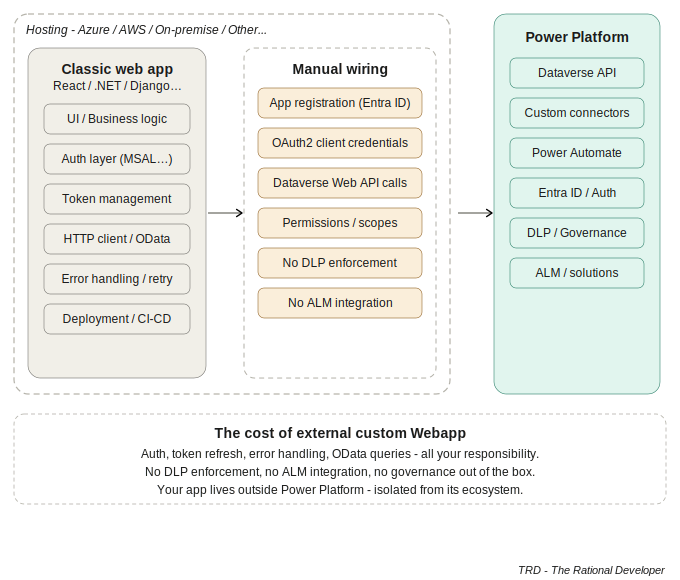
Usually we first build the WebApp with the modern UI and cool dynamic features, but when it comes to hosting, the application is usually hosted on platforms like Azure, AWS, or Hostinger.
The fact that the web app is hosted outside the Power Platform forces us to write additional code for authentication, binding to the Dataverse API, and more. Furthermore, when this web app must be integrated into a Model Driven App or D365 form, it requires complex work like bidirectional authentication to ensure the D365 user can use it from another Power Platform context. This is just the tip of the iceberg, without even mentioning deployment or ALM, but let’s stop there regarding classical web app integration.
Power Apps CodeApps architecture
Here the architecture of the Power Apps CodeApps.
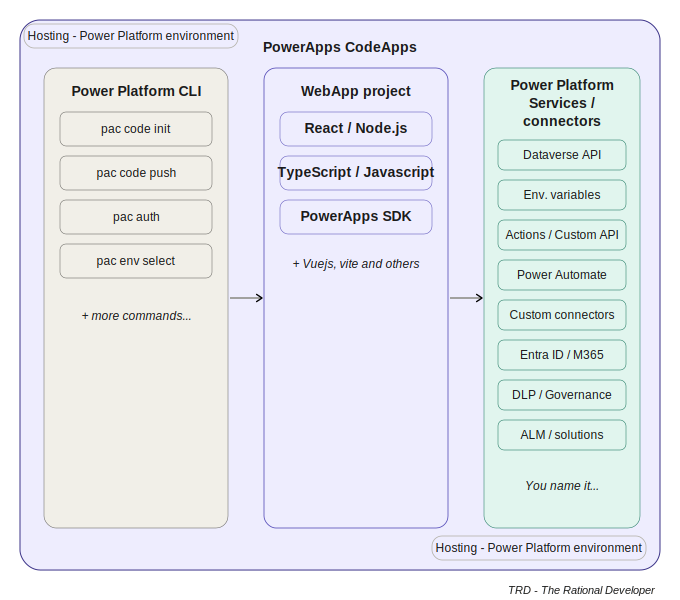
As we can see on the picture above, CodeApps is composed of three main parts :
- The WebProject : The name says it all. It is the core of CodeApps. It contains the files, IU, Pages that are served to the client. The IUs are Built with React/NodeJS, TypeScript/Javascript. The PowerApps SDK helps give direct access to Power Platform services and data sources.
- The Power Platform Services and Connectors : These layers are accessed via PowerApp SDK NodeJS library. It helps developer generate metadata and type of the API and connectors
- Hosting : Power Apps CodeApps does not need external hosting, it is hosted on the Power Platform environment, and can be deployed to Test, Prod environment via solution deployment
- PAC CLI : The tool that is used for most Power Apps apps, it is also used for CodeApps. It is used to transform/convert a React Project into a CodeApps Project, and also provide the command to deploy to an Environment and generate the public url endpoint of the App.
I see only advantages in bringing the capacity to build classic or custom web apps to the Power Platform with CodeApps. As we saw in the architecture of CodeApps, it combines the open-source building tools of modern web apps and UIs with the enterprise-ready tools and governance provided by the Power Platform services and hosting.
By combining these two patterns, it simplifies the development of modern web apps for the Power Platform community. It removes the burden of handling app registration and authentication for integration, connecting to other data sources and connectors, managing permissions and scopes, and dealing with DLP or Content Security Policy, which is very hard to achieve with external custom web apps.
CodeApps Limitations
Although there are many advantages to CodeApps, it still has some limitations. Some of these are simply in the development phase and may be too early to be available, while others are not related to technological constraints. Instead, they are intentional limitations imposed by Microsoft. The tool is so capable that they had to set certain boundaries for now, which we will discuss in detail in the “Philosophy Behind CodeApps” section.
Here are some limitations of CodeApps:
- CodeApps don’t yet support IP restriction.
- CodeApps don’t support Power Platform Git integration.
- CodeApps aren’t supported in the Power Apps mobile app or Power Apps for Windows. ( on-purpose limitation)
- CodeApps don’t yet support Power BI data integration (PowerBIIntegration function), but can be embedded in Power BI Reports using Power Apps Visual.
- CodeApps don’t support SharePoint forms integration. ( on-purpose limitation)
CodeApps Applied Use Case
Now that you have the big picture of what CodeApps is, and how it simplifies development by removing the burden of integration, let me share some use cases and problems where the CodeApps pattern can help provide a solution:
B2B External Portal
A common scenario where enterprise architects require a custom web app is when they need to provide a portal for clients to track orders or contracts without compromising security. Since CodeApps is a tool for building custom web apps hosted within the Power Platform, it can meet both requirements: providing a functional portal and ensuring secure B2B external access via Azure Guest accounts.
Single Page application / Rich Popup
Broadly, CodeApps can be used to replace any type of web app that does not require multi-page sessions. These types of web apps are called Single Page Applications (SPAs), and there are a lot of custom web apps of this type on the Power Platform :
- Custom WebRessource
- Custom Popup ( built with Webressources )
- Iframes
- Canvas App
Most Canvas App developers would be surprised to see Canvas App on the list above, but don’t be. It is called an “evolution,” and you should get used to it. I will elaborate more on that in the next following sections.
The Battle Of The Titans : CodeApps VS. Others Power Apps products/tools
I am seeing some debates within the community regarding the perceived uselessness of CodeApps, based on the argument that we already have tools to build every type of app that CodeApps was designed for. Really, do we ? From this point of view, I could argue the contrary: “If there are many tools required to do what one tool can achieve, what is the utility of those other tools if CodeApps can do it all ?” Not funny, huh ?
But let’s be pragmatic and compare them one by one.
CodeApps VS. WebRessource / Custom Pages
In the old days, and even recently, I frequently used web resources to create custom web UI integration with external APIs. With web resources, you are limited to JavaScript; it is not possible to use TypeScript because web resources are rendered directly in the browser without prior compilation by a build tool. Yes, you can reference a React app from a web resource, but then you are essentially trying to do what CodeApps does natively.
Besides, if you need to reuse the same web resource elsewhere, placing it outside of a form is extremely difficult. This is due to the Xrm context’s object lifecycle, which behaves inconsistently between an entity form, and entity list page (menu), and other locations.
If you need to reuse it in an external application, you cannot access it for two reasons: first, you need authentication (which is also the case for CodeApps); second, even if you authenticate and open the resource in a window, it won’t work because the Xrm context will be missing, causing your page to crash. This inconvenience does not happen with CodeApps because the context is handled separately within the app via the Code Apps SDK, and it does not need to be opened inside a Model Driven App or D365 to work correctly.
Custom pages do open correctly from the menu, but the states, reactivity and fluidity are not quite there yet.
In terms of UI, you lose too much time building interfaces with HTML and CSS using web resources. However, since CodeApps is built with React, you have all the latest and most flexible technologies at your disposal for your web apps. React speeds up your development process like magic.
Clearly, CodeApps is the way to go when you need to build custom popups or complex modern UI integrations in Model Driven Apps and D365.
CodeApps VS. PowerPages
A common business scenario where solutions architects require custom web app integration is when a business needs engagement pages. These allow clients to enroll via a contact form, receive product updates, contact sales to raise an issue, or even track orders. Power Pages satisfies these business requirements well because it supports anonymous connection/navigation, or custom login via contacts , whereas CodeApps currently does not.
The limitations of CodeApps in this area are not necessarily technical but rather on-purpose restrictions. Because CodeApps is hosted under the Power Platform, it is currently restricted to Azure AD (Entra ID) authentication. This means it cannot yet support the diverse external authentication providers – such as LinkedIn, Google or anonymous navigation – that Power Pages handles so effectively for public-facing portals.
So, for now, Power Pages remains the go-to solution for external client engagement, while CodeApps continues to evolve within the boundaries set by Microsoft.
CodeApps VS. CanvasApp
Canvas Apps were created to help makers and developers build robust custom mobile applications (for phone and tablet) while leveraging the benefits of Power Platform services, data sources, and connectors.
Wait… it feels like I am describing CodeApps here, doesn’t it ? Let’s continue then.
The primary concept behind Canvas Apps was to build mobile applications using drag-and-drop, ready-to-go components. However, over the years, we have seen more and more makers performing heavy coding to achieve professional results. Although it is still technically “low-code,” the complexity of the Power Fx logic has grown significantly.
One might ask: why perform what feels like 80% coding when the tool was intended to be a drag and drop interface with minimal code ? Perhaps we have reached a point where a new tool is necessary. This is where CodeApps enters the picture. It possesses all the capabilities needed to build modern web and mobile applications without forcing makers into “heavy low-code” or making experienced developers struggle with a tool designed for makers. Furthermore, CodeApps supports most of the features found in Canvas Apps, including services (connectors and data sources), governance (scope and DLP), and security (authentication, CSP, etc.).
CodeApps could potentially retire Canvas Apps, but I do not want to upset anyone. Let’s wait two more years and see what happens.
Given those factors, I predict that CodeApps will inevitably phase out Web Resources and Custom Pages. While Canvas Apps may also be retired for professional developers, they will likely remain available for citizen developers or App Makers who require a low-code environment due to limited programming experience.
Philosophy behind CodeApps
The philosophy behind CodeApps is relatively straightforward: it aligns closely with the broader vision of Microsoft and the Power Platform, both of which are heavily influenced by the open source ecosystem. This approach creates a sinergy between modern open source web tools/paradigm, AI, and stable Application Lifecycle Management (ALM).
Why Open source ( Modern WebApps ) ?
Why favor Open Source and Modern WebApps ? Simply put: the open source community innovates faster than any proprietary model/software group ( correct me if I am wrong). Microsoft recognized this shift early on, as seen in the evolution of Azure or .NET Framework since 2016. Azure moved away from a strict Windows Server dependency to embrace Linux‘s compatible tools, largely because the majority of Azure clients now host their infrastructure and SaaS products on Linux infrastructure. Similarly, the transition from .NET Framework to the cross-platform .NET Core allowed applications to run seamlessly on any OS. This happened because technology evolves more rapidly in an open environment! and to remain competitive, Microsoft opened its platform to the community to fuel its own evolution.
React and Node.js represent the gold standard for stable, modern web development. To scale the Power Platform and attract more enterprise business, the most effective strategy is to democratize business application development through CodeApps. By adopting these industry-standard frameworks, Microsoft allows professional developers to build sophisticated UIs within the Power Platform ecosystem using stable and well established tools others community already use it too, rather than forcing everyone into proprietary, low-code constraints.
Why AI ?
AI is not just an add-on : it is also one of the guiding forces behind Microsoft’s suggesting CodeApps. While ‘Vibe Coding’ might seem like a gimmick( and I don’t particularly appreciate), it is the bridge that allows citizen developers to transition from the restrictive Canvas environment into the professional-grade world of code-first tools like CodeApps with less effort without having to master coding.
The current maintenance model for proprietary languages/schema (like those in Canvas Apps or Power Pages) is unsustainable because it relies on specialized lexical interpreters. By democratizing development through standard frameworks like React and Node.js, Microsoft leverages the power of LLM/Model Context Protocol (MCP). This shift ensures that developers or AI agents can maintain and evolve business solutions using universal coding standards, significantly reducing the long term ‘maintenance cost’ associated with niche, Power Platform’s specific languages/lexical.
Why ALM ?
Effective ALM has been the ‘missing link’ for the Power Platform due to its reliance on proprietary/platform-specific languages like Liquid and Power Fx, sometimes PCF when mixed with (Canvas App or Model driven Apps), which are difficult to track in traditional version control. CodeApps solves this by adopting a code-first approach based on open standards like TypeScript, NodeJs (that are basically HTM, CSS, JS). By moving away from opaque platform-specific expressions and embracing readable, standard code, CodeApps enables true CI/CD. It allows development teams to use the same open source build tools and patterns as the rest of the software world, ensuring that no logic is ‘left behind’ and that every change is transparent, testable, and repeatable.
Summary
PowerApps CodeApps is not just another tool in the Power Platform arsenal. It’s a fundamental shift in how we build modern web applications within the Microsoft ecosystem. By combining the innovation speed of open source frameworks (React and Node.js) with the enterprise-ready governance of Power Platform, CodeApps removes the integration burden that has plagued custom web app development for years.
We have seen how CodeApps addresses real limitations of existing tools: the rigidity of Web Resources, the authentication constraints of external portals, and the growing complexity of “heavy low-code” in Canvas Apps. More importantly, we’ve explored the philosophy behind it… Microsoft’s strategic bet on open standards, AI-assisted development and sustainable ALM practices.
Whether CodeApps will eventually replace Canvas Apps for professional developers or retire Web Resources entirely remains a mistery. But one thing is clear: this is Microsoft’s answer to make the Power Platform competitive with modern web development standards while maintaining its low-code accessibility.
In the next article, we’ll move from theory to practice. I’ll walk you through building your first CodeApps project step-by-step : from initialization with PAC CLI to deployment.