P1 : How to adopt Power Platform Pipelines in your projects
Introduction
When I was first introduced to ALM at a Power Platform French Summit (PPFS) event in 2023, I sat through three different presentations and still couldn’t grasp what it really was or how to actually adopt it
It was only after I actually implemented and used it that the lightbulb finally went off. I realized that ALM is essentially a practical derivative of the Agile Manifesto – a way to bring continuous value and structure to development!
So, what was the barrier? Was it the acronym itself? Or was the concept just not mature enough yet? These are just some of the questions I will answer in this overview and preparation for a deep-dive series.
What is ALM
Do you remember the Agile methodology and its manifesto principles? It is a methodology used for project management as a whole that focuses more on human interaction than processes and tools.
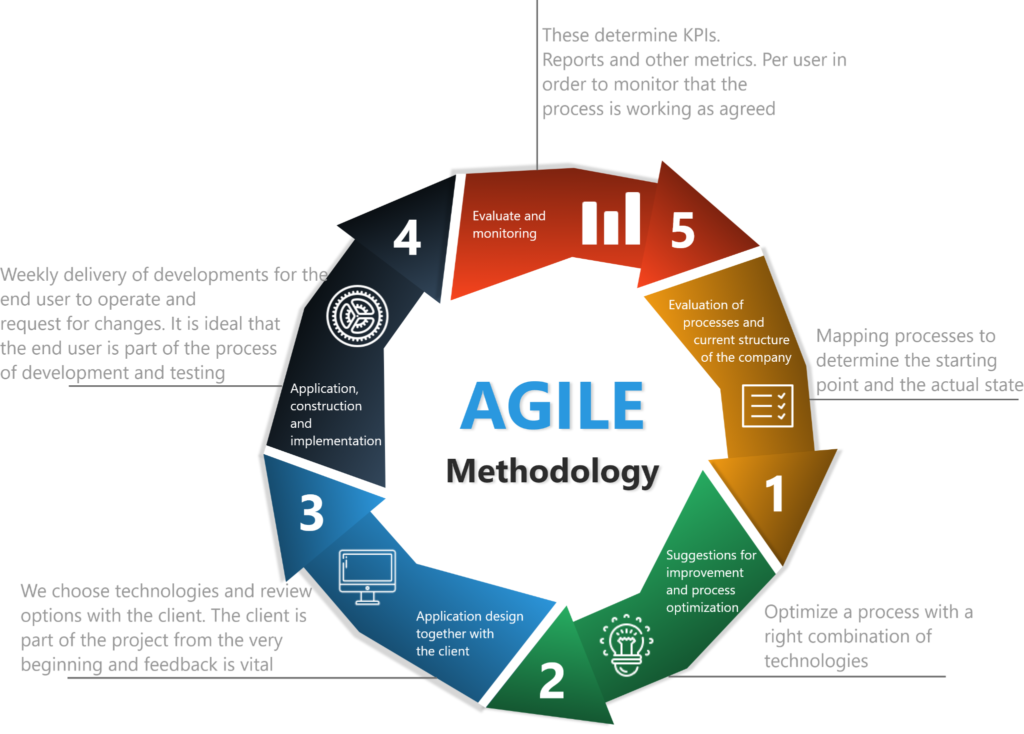
Well, ALM (Application Lifecycle Management), as the name suggests, it is just another term for Agile or DevOps; it focuses more on the tools and processes used to manage the delivery of applications and software more quickly and safely. Agile is broad in the sense that it manages the entire cycle of a software project (people, finances, planning, delivery, testing, monitoring, etc.). In contrast, ALM only manages delivery (integration and deployment), monitoring, and perhaps testing.
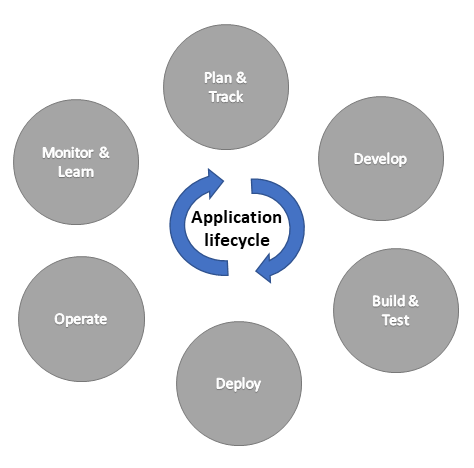
If you see the above illustration for ALM from Microsoft, it seems quite similar to an Agile illustration; however, if you look carefully, it does not have a stage for people, finances, requirements, etc. It simply shows you the difference between the two. It seems that every day, Microsoft is trying to equate ALM with Agile, but in terms of Dynamics 365 and Power Platform projects, we are not there yet. Even if we were, we already know the Agile methodology anyway. Just keep in mind that in the Microsoft ecosystem, especially for D365 and Power Platform projects, the automation or rapid delivery of applications is what we call ALM.
Since ALM focuses more on processes and tools, one could ask: what are the processes and tools one could use on D365 and/or Power Platform projects? Well, for D365 and Power Platform projects, there are at least three well-known platforms that contain the processes and tools that allow us to adopt ALM in our projects, these are :
- Power Platform Pipelines ( with copilote as optional ): Standard solution provided by Microsoft for D365 & Power Platform Projects
- Azure Devops : Can be used to extends Power Platform Pipelines, or can be used alone with more advanced process and tools for ALM for D365 & Power Platform Projects
- Github : Can be used to extend Power Platform Pipelines, or can be used alone with more advanced process and tools for ALM for D365 & Power Platform Projects
In this four-part series, we will tackle those three ways of doing ALM for D365 and Power Platform projects. Specifically, in this first article, we will tackle the first one: Power Platform Pipelines.
What are Power Platform Pipelines, anyway ?
Since ALM focuses more on processes and tools, Power Platform Pipelines is a set of tools that helps us create and establish automated processes to allow us to implement ALM on D365 & Power Platform applications, in order to integrate and deploy new features automatically and faster.
As the name contains ‘Pipelines’ at the end, it means it is a CI/CD pipeline in the Power Platform way of doing things. The key thing to understand here is that Power Platform Pipelines allows developers and makers to integrate and deploy Dataverse solutions – containing tables, forms, plugins, JavaScript, apps, etc. – automatically, without having to export or import Dataverse .zip solutions manually.
Why do we need ALM, and how can Power Platform Pipelines help you achieve it ?
I understand that if we can do it manually as we have done, one could ask: why do we need Power Platform Pipelines? Well, software construction can be complex and delivery can be time-consuming, while clients and end users are impatient to receive their new application or feature. If we have the application or feature, why not deliver it right away to be tested and get feedback ASAP? The way to do that in the most efficient way is by using ALM, and Power Platform Pipelines can help achieve that.
Also, one of the principles of Agile and ALM is feedback. In order to deliver high-quality software or applications, we need constant and fast feedback from users. We can only achieve that if we have proper tools and processes implemented automatically to deliver features as fast as possible and receive the feedback needed to improve the software. Manually, we can forget environment variables, or forget to reactivate Cloud Flows (Power Automate) and Plug-in steps. I guess we all need some sort of ALM on our projects, whether they are small or big.
What are the Power Platform Pipelines limitations ?
Power Platform Pipelines is not the ultimate tool and process that does everything; it has its limits. Here are some features that are not included in the OOB (out-of-the-box) ISV solution or application:
- The deployment is not fully automated; it requires extensions via Power Automate or custom actions
- To initiate deployment it needs manual click ( at least 2 or 3 )
- CIt cannot be triggered by a specific schedule; the deployment must be initiated manually or through an extension of the pipeline.
- It can only handle semi-automated deployment, not full integration. This means that if you want to publish a new version of a JavaScript file or a plugin, you still need to use Copy/Past or the Plug-in Registration Tool (manual configuration).
- It can only export solutions directly from a source environment, not from a source control system like Git. However, you can add this feature by extending the pipeline, to do it from git source control.
The limitations listed above may not be an issue for small projects, but they can be quite annoying in medium or large-scale projects. The OOB Power Platform Pipelines can be extended via Power Automate or through custom processes to become fully automated, but that is a subject we will discuss in parts 2 through 4.
When to Adopt Power Platform Pipelines ?
Before trying to adopt Power Platform Pipelines, you need to consider its limitations and the advice below. Basically, you should feel comfortable using it on any small project, regardless of the number of solutions. If you have more than two solutions in a small project, it is manageable to automate the deployment of both, even if they have dependencies.
However, for other configurations, you should only consider adopting it for medium or large-scale projects if the project has one main solution, or at most two (one main and a secondary solution that does not require daily deployment).
Also, you can adopt Power Platform Pipelines at any phase of a project – beginning, middle, or end – as long as no ALM has been implemented yet. While some ALM methods are best implemented at the very start, you are safe to introduce Power Platform Pipelines at any stage.
How to adopt ALM with Power Platform Pipelines ?
Prerequisites for Power Platform Pipelines
In order to adopt ALM with PPP, you need to fulfill the following prerequisites :
- A minimum of three environments are necessary: a Development environment, a Host environment for the pipelines, and a Target (Production) environment.
- All environments used in pipelines must have a Microsoft Dataverse database.
- You must have a Power Platform administrator or Dataverse system administrator role to install the pipelines application.
- All target environments used in a pipeline must be enabled as Managed Environments : in our scenario since the Production or Preprod is the only target environment, then it is the one that must be Managed.
- In a real-life project, the Host environment – and the Target environment(if it is the Prod) – must be of the Production environment type. For licensing reasons, in our examples, the Development environment will be of the ‘Developer’ type, while the Production and Pre-prod environments will be of the ‘Trial’ type
Purpose of each environments
In order to proceed, we need to create three environments; however, I think it is important to first define the purpose of each one.
- Host environment : This environment is used to host the installation of the Power Platform Pipelines Microsoft ISV solution, which includes the Model-driven app Deployment Pipeline Configuration. It is also used to store your pipeline configurations, run history, and the monitoring data for your custom pipelines.
- Development environment : This environment is the one we typically use to create our solutions and develop our plugins, workflows, web resources, and models. It is the environment that contains every customization made by the Developers or App Makers.
- Target environment : As the name implies, this is the environment we typically use to deploy our customizations via solution import. With ALM, our pipeline will automatically export from the source and import into these environments. This can be a Test, Pre-prod, or Production environment.
I am assuming you already have a Development and Target environment; you just need to create a third one to act as the Host to continue with our exercise. In the end, your configuration should look similar to this :
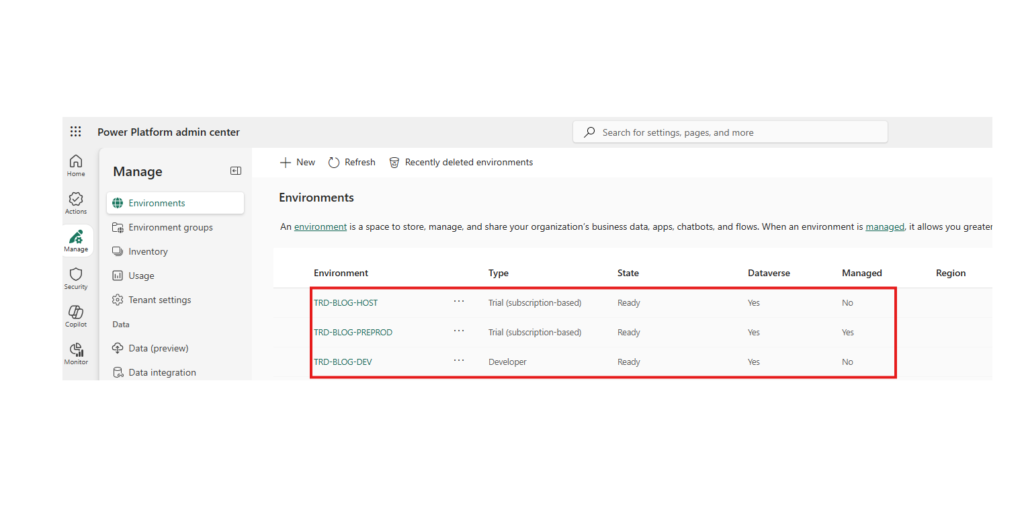
Setup of Host environment
In this section, we will install the Power Platform Pipelines D365 apps to implement ALM for our project, which includes both the Development and Pre-prod environments..
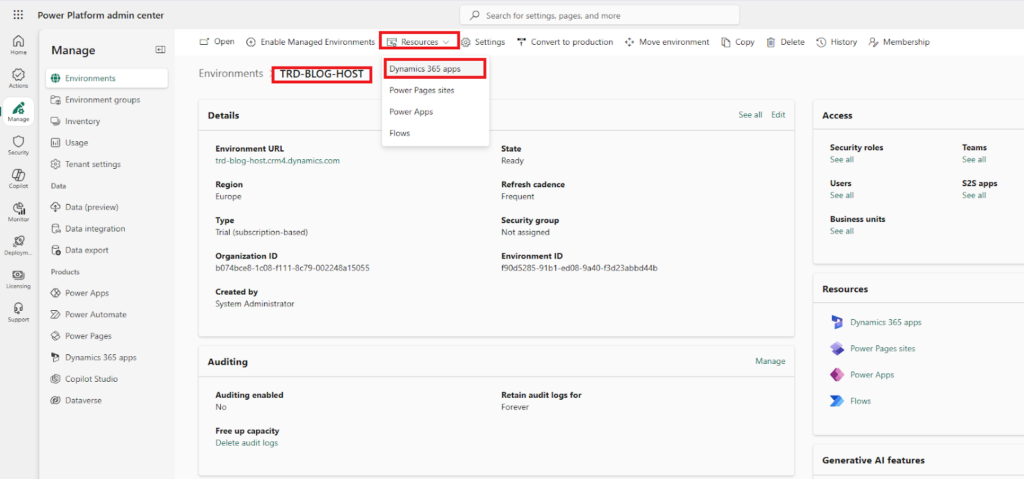
from the Power Platform Admin Center→Environments select the Host environment
Select Resources → Dynamics 365 Apps
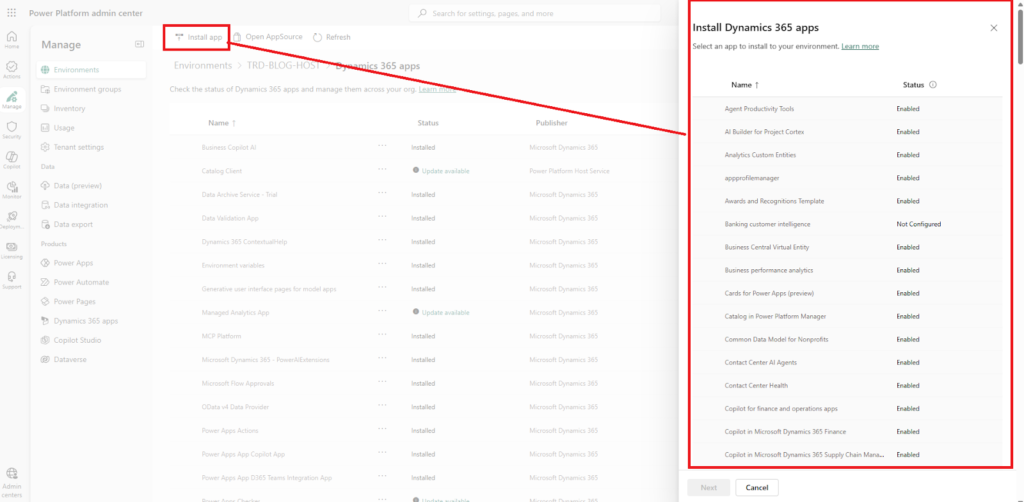
Click on Install app to search for Power Platform Pipelines App
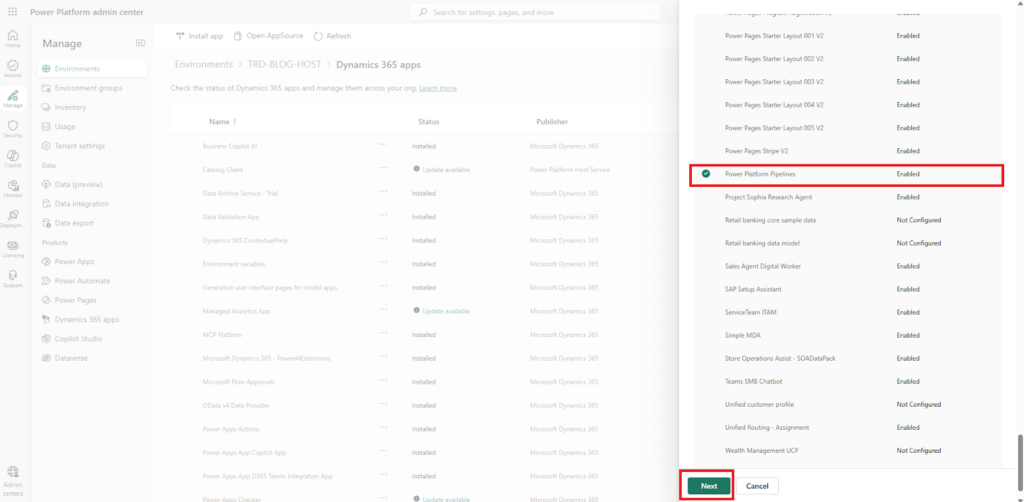
Scroll down select Power Platform Pipelines and click Next button
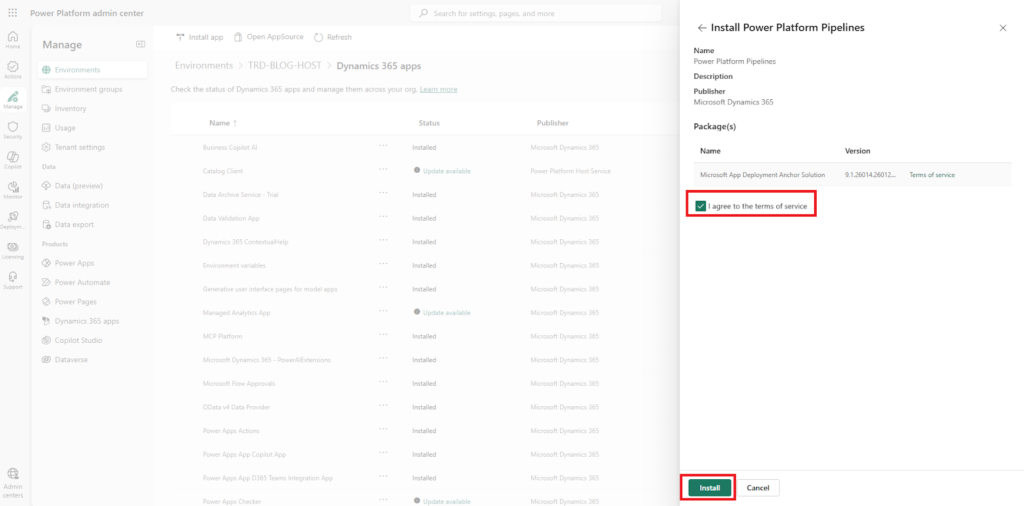
Check the box to agree the terms of service, and Click the Install button, to install the package. Note that the installation can take minutes or one hour to finish the full setup.
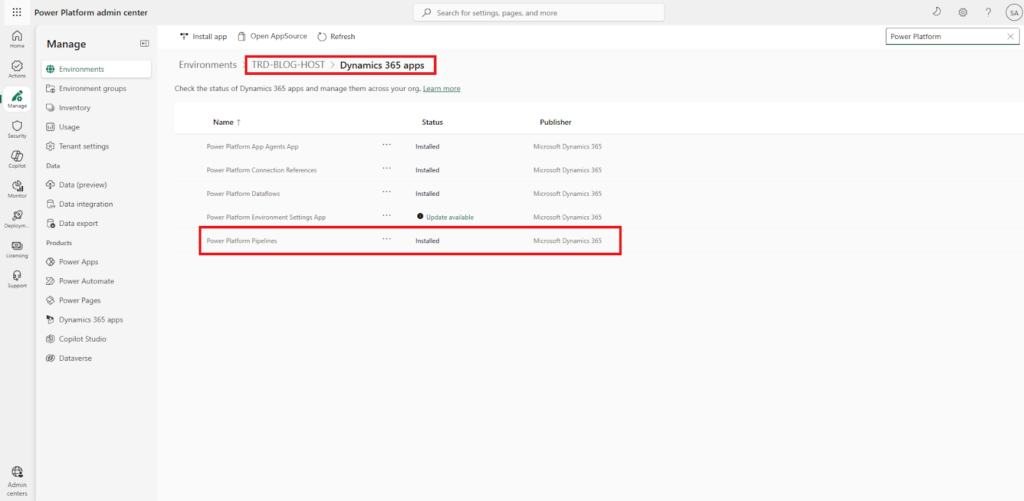
After the installation is done, if you go back to Ressource → Dynamics 365 Apps and search for Power Platform Pipelines you should see the Status as Installed.
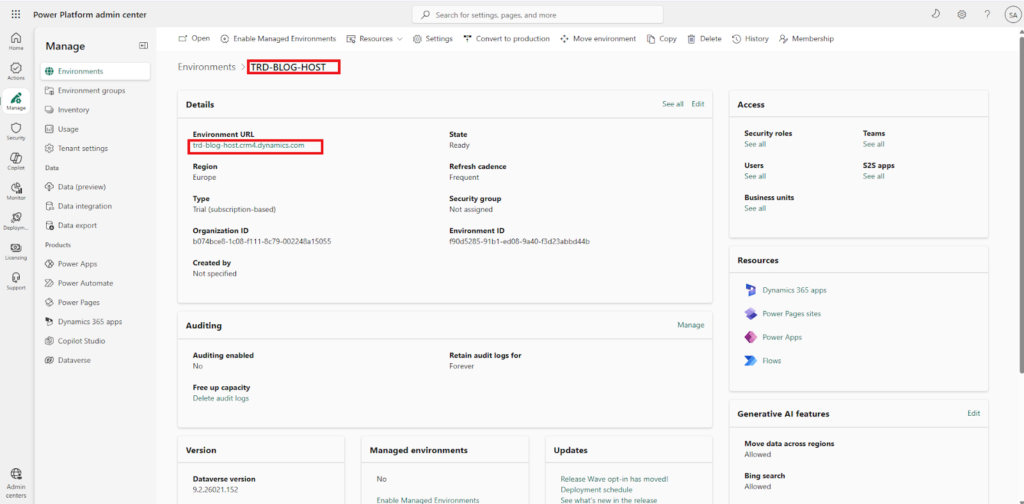
If you select and open URL of the Host environment from Power Platform Admin Center you should be able to see the model driven app Deployment Pipeline Configuration dedicated for ALM with Power Platform Pipelines
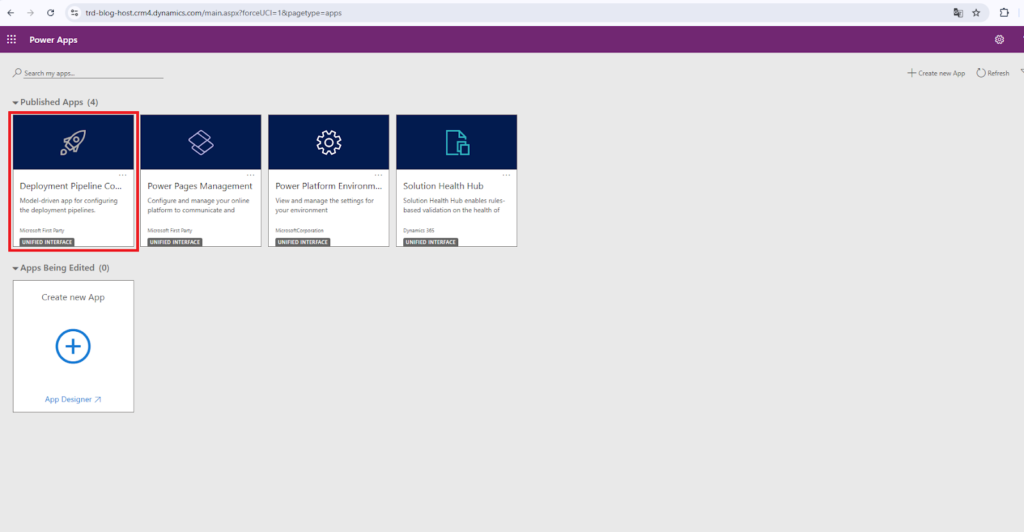
Click to enter and see what it looks like
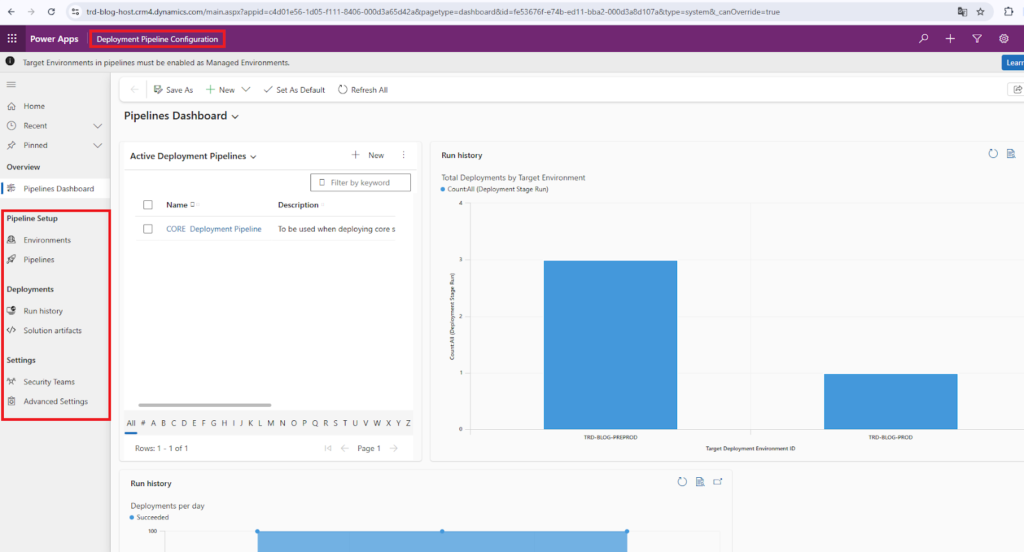
- Environments : Where we define wich environment will be participante on our pipelines
- Pipelines : Where we define pipelines that will be export and deploy our solutions from source to target environments
- Run history : Where we observe running histories of success or failed deployments
- Solution artifacts : Where .zip solutions are stored as artifacts
- Security Teams : Where we define wich user/team has special rights for interacting with our pipelines.
At this point we have set up all the prerequisites to start implementing ALM with PPP in our project.
Summary
In this first part, we have explored what ALM is, its purpose, and how it can benefit our projects. We have also examined its limitations and when to use it; we now know that it is particularly effective for small projects. One of its primary advantages is that Power Platform Pipelines can be adopted at any phase of a project – beginning, middle, or end – provided that no other advanced ALM method has been implemented yet.In the second part, we will get our hands dirty by implementing Power Platform Pipelines here to solve real-life use cases regarding automated deployment