Power Platform encapsulation: the technique you didn’t know you needed
Introduction
Have you ever tried to customize the Notes (annotation) table and failed ? Have you ever tried to reverse-engineer or change components on one of Microsoft’s msdyn_ solutions and wondered why they are untouchable ? How is that possible ?
Well, this is what I call “Encapsulation”. It is one of the most powerful techniques we have to protect our delivered solutions, components and apps, and we will see here the three ways of applying encapsulation on Power Platform. Whether you are a Maker/Functional, an ALM person, or an advanced Developer, one of the three ways will suit you, so stay tuned.
What is encapsulation anyway ?
The encapsulation technique comes from the Object Oriented Programming paradigm. Just from this statement, old school folks will instantly get it, but my articles are not only for old school folks, so let me explain it to the new generation too.
Encapsulation is one of the three pillars of Object Oriented Programming. It lets library writers protect their classes by defining which members are private, which are protected – meaning accessible only from derived classes, and which are fully accessible or modifiable by clients (the library users, meaning other developers). This technique alone let developers write reusable code and hand it to others safely, knowing there is no way to use it wrong, because the protection is baked in before the binary (dll, exe, etc.) is even produced and shipped to others.
This is the same rationale Microsoft applies to most of their msdyn_ solutions, and we should use it more often to bring more safety when we ship reusable packages and components, especially in the age of AI and coding agents that can modify everything at once with a single prompt, sometimes by accident.
The common sense way of protection
In the Power Platform community we often hear that a managed solution is the way to go if you want to protect your solution’s components from being modified! But does it really do the job we expect (eg. lock components) ? Well, let’s give it a try …
I was working lately on a Docusign full custom solution for Power Platform, since I want to make it reusable and make it available for anyone, it will be a good working base for our demonstration.
I already deployed the solution as managed to a target environment, exactly as anyone wanting to reuse it would do. So let’s go and try to modify it.
Here is my solution, you can clearly see that everything is Managed
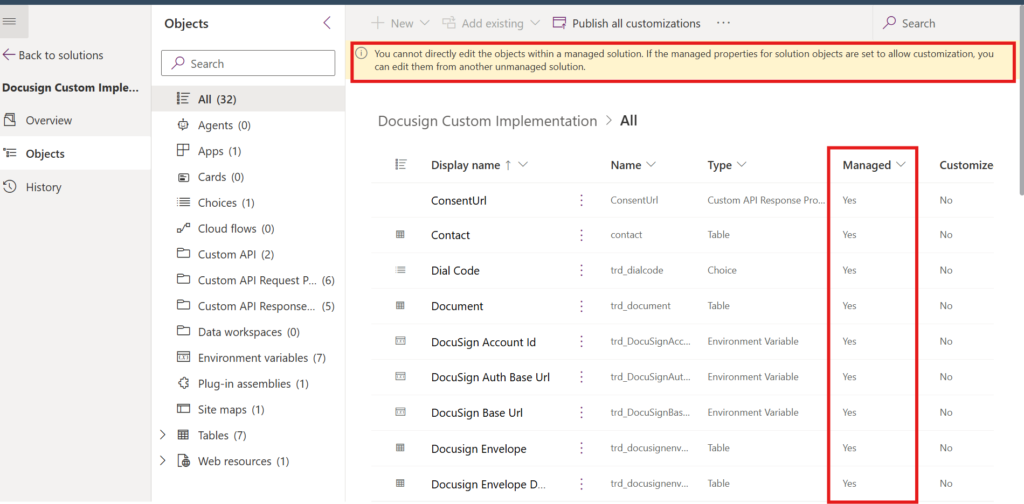
Lets try to modify one the table by modifying an existing field from the Default solution :
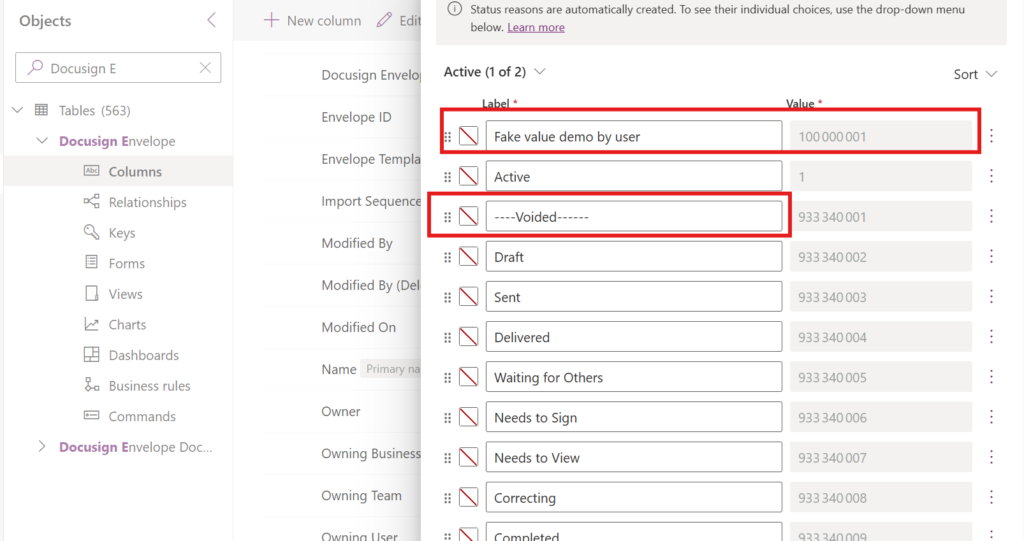
As you can see, I was able to add a new value to the Status Reason and modify an existing one. If the Custom API and the plugins used in this package rely on optionset labels directly, or on early-bound generated classes, this will completely break the internal process and nothing will work as expected. We just broke the whole machinery by changing one field, only one field.
The modification could be on purpose, or just an accident from a junior developer, or even from an AI agent that an inexperienced developer let loose on the environment.
You can also use this query to know if your component is protected or not :
https://your-org-name.crm4.dynamics.com/api/data/v9.2/IsComponentCustomizable(ComponentId=@p1,ComponentType=@p2)?@p1=8c6799b8-6722-4b43-9bcb-34665edb0858&@p2=2- ComponentId : the MetadataId of your component, is this case, for statuscode field
- ComponentType : The component type in our case is field , so the component type is 2 , for a table it would be 1.
Response:
{
  "@odata.context": "https://trd-blog-xxxxx.crm4.dynamics.com/api/data/v9.2/$metadata#Microsoft.Dynamics.CRM.IsComponentCustomizableResponse",
  "IsComponentCustomizable": true
}
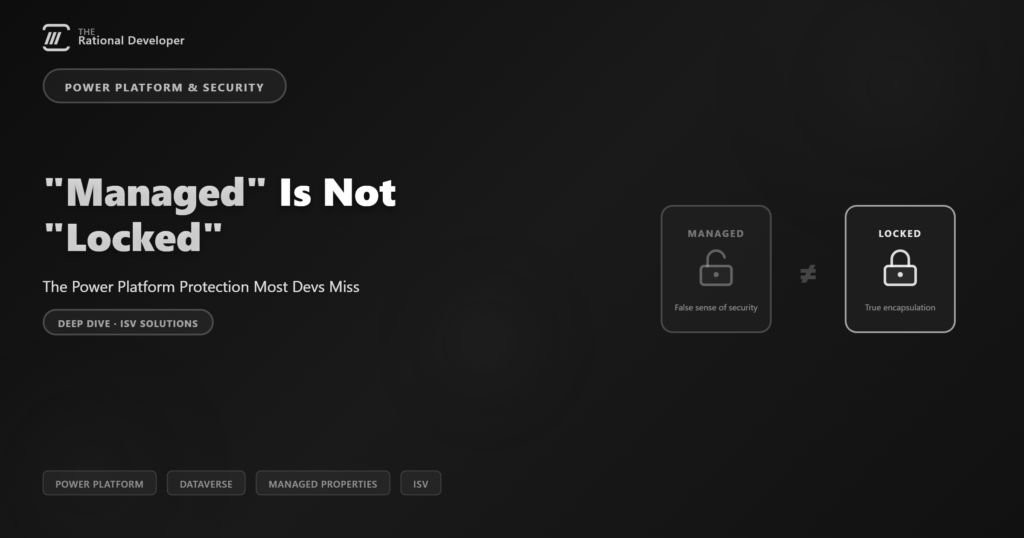
So clearly, even when you deploy your solution as managed, that does not protect your components from being modified and misused. They say “managed”, but the point you must keep in mind is this : “Managed” is not the same as “Locked”. How to really lock your solution and components so no one can modify them is the subject of the following sections.
The real answer to protection, Managed Properties
The answer is simple, but applying it is what makes the subject a little bit complex. So the real way to control and protect your components from being misused or modified is Managed Properties. Let me say it again : “Managed Properties, for individual components”. Managed Properties let you control which component in your solution can or cannot be modified once the solution that contains it is installed as managed on another environment.
Every Dataverse/D365 solution component has a managed property called IsCustomizable that is true by default. If you set it to false and import the solution as managed, that component is no longer modifiable, not even from the default solution. But there is a crucial subtlety here that almost everyone misses, and it is exactly what makes the difference between a component that looks locked and one that truly is. We will get to it in the API section.
A little moment of attention, avoid pitfalls
- Dataverse/D365 components can have subcomponents. A concrete example is a Table : it is a component, but it has subcomponents such as fields, forms, views and charts, and each of them has its own managed properties, independent from the parent. So if you want to seal an entire table, you must apply IsCustomizable=false to each subcomponent individually. Applying it on the table alone is not enough.
- Another important point is the Field (Attribute) component. A field has a “Required Level” property (Business Required, Optional, Recommended). This one does not have its own IsCustomizable : it has instead a managed property type AttributeRequiredLevelManagedProperty. To lock it, you set its CanBeChanged to false, so that users of your solution cannot change the requirement level and impact the expected behaviour. In C# it looks like this : attr.RequiredLevel = new AttributeRequiredLevelManagedProperty(AttributeRequiredLevel.None) { CanBeChanged = false }. Keep the CanBeChanged keyword in mind, for the API method, it is in fact , the real lock.
With these two points in mind, you might wonder : is there something else I should know, something that summarizes it all ? These two points cover the specific subtleties of component managed properties. The rest is the same IsCustomizable switch applied per component.
Here is a diagram that summarizes the Managed Properties by component type and group :
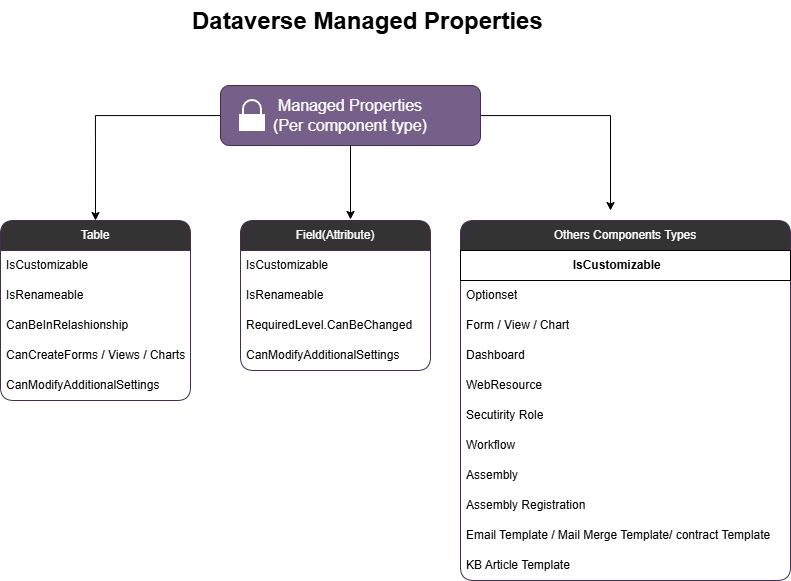
In order for this to work, two conditions must be met
- On the source environment (DEV), where the original unmanaged solution lives, IsCustomizable must be set to false on each concerned component.
- The solution must be exported as Managed
Once these two conditions are met, the protection cycle is completed and in any environment where your solution is deployed the components will not be customizable, not even from the default solution by organizations that use your solution.
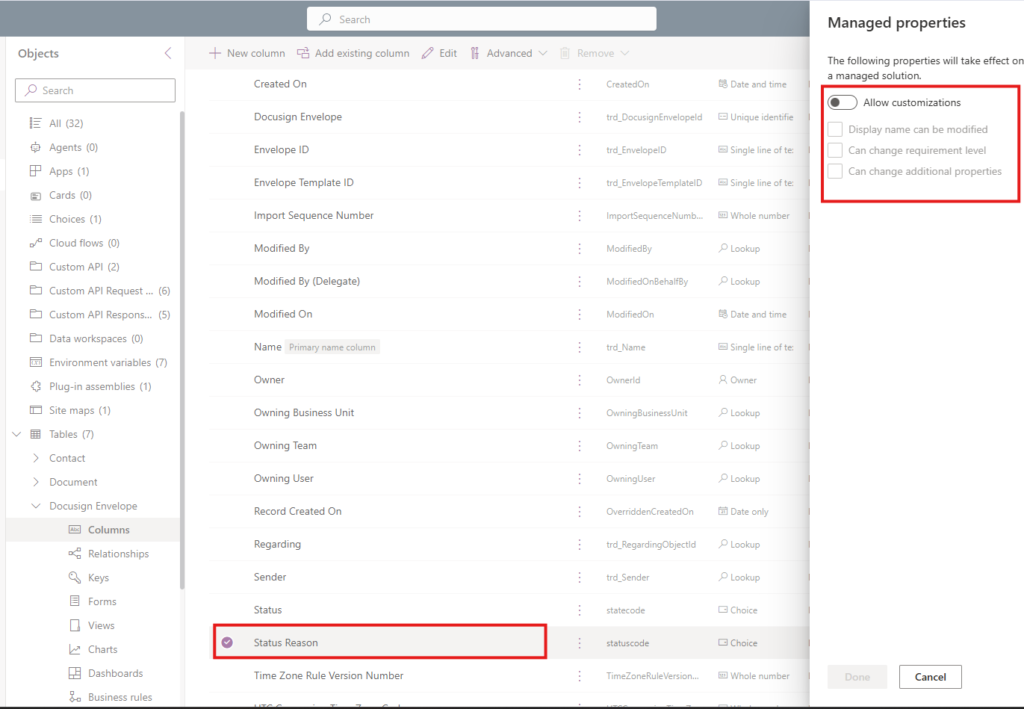
I have applied Managed Property on the field statuscode, the one we saw on the previous section. I will show you how to apply it later. But, just note that I have applied.
After we export and install on the target environment, we can then rerun the query to check if customization is or not allowed on a component : As we can see, the modification is in effect IsComponentCustomizable = false.
Response:
{
  "@odata.context": "https://trd-blog-xxxxx.crm4.dynamics.com/api/data/v9.2/$metadata#Microsoft.Dynamics.CRM.IsComponentCustomizableResponse",
  "IsComponentCustomizable": false
}
If you try to modify from the default solution : The field in question is locked
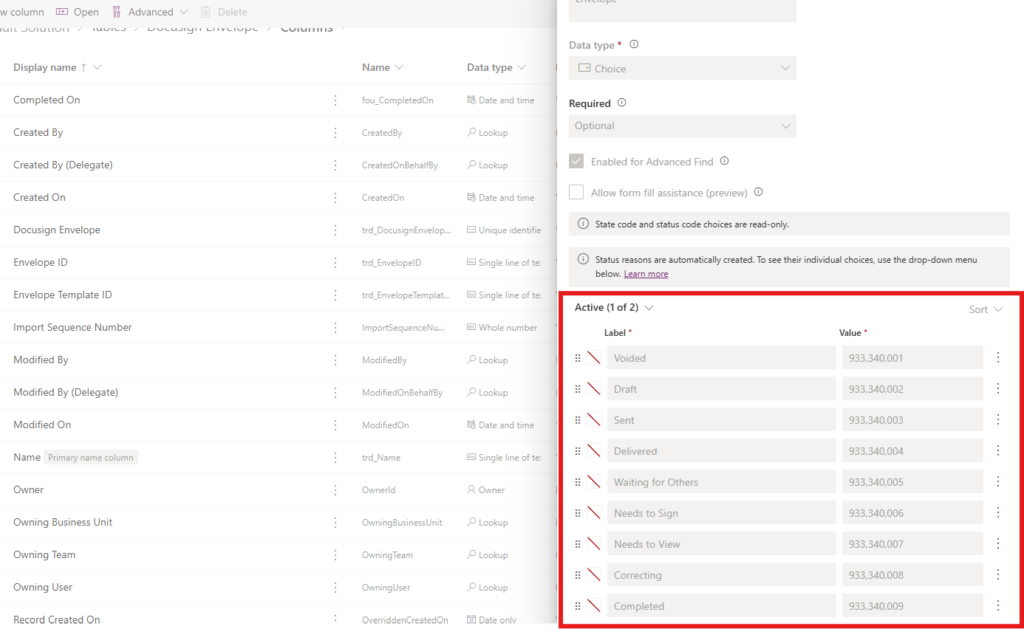
This is what true encapsulation with Managed Properties is all about.
3 Practical ways to apply encapsulation to protect
There are three ways to apply protection via Managed Properties to your components and subcomponents. All three must be applied from the source environment, while the solution is still unmanaged, before turning it into a managed solution to be distributed. But be aware : these three ways are not equivalent. Two of them only get you halfway, and the third is the only one that fully closes the door. Keep reading to see why.
Applying encapsulation via Maker Portal
The easiest and most intuitive option, and the most practical for functional people, is the Maker Portal. From your source environment, open a solution, select the component you want to protect, click the “…” menu, choose Managed Properties, and disable “Allow customizations”. Note that this only sets the Value of IsCustomizable to false, remember this, it matters below.
Applying encapsulation via XML schema
The second way to apply encapsulation is by editing the XML directly, either on a single component file or on customizations.xml after unpacking the solution.
This option is very practical for ALM teams or cases. After you unpack your solution with pac solution unpack command, you have this result :
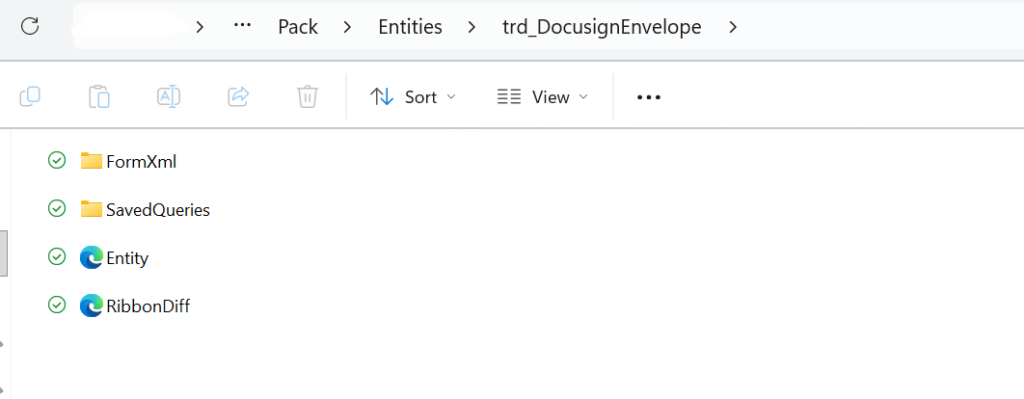
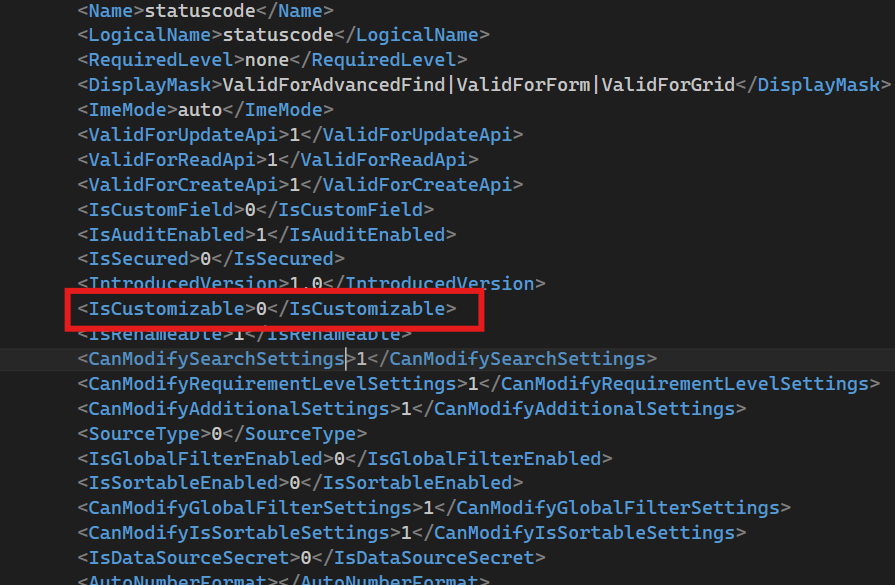
If you want to protect statuscode field, just open the Entity.xml and modify the IsCustomizable attribute to “0”. Same effect as the Maker Portal : it sets the Value to false, nothing more, nothing specific for RequiredLevel Managed Property.
Applying encapsulation via API or SDK
For pragmatic developers who want to build a tool, or a plugin for XrmToolBox, the best choice is the Dataverse API or SDK, to apply protection programmatically. And this is where the three ways stop being equivalent.
The flow goes like this :
- Depending on the component type, instantiate a RetrieveEntityRequest or a RetrieveAttributeRequest.
- Retrieve the metadata for the table or field in question.
- Change the managed properties you care about.
- Execute an UpdateEntityRequest or UpdateAttributeRequest, then check the change on the source environment before exporting.
Here is the essential part, and the reason the API is a more powerful method to lock your ISV. IsCustomizable is not a simple boolean : it is a BooleanManagedProperty with two levels. Value is the on/off state, the one the Maker Portal and the XML let you set, and it decides whether the component is customizable once installed as managed. CanBeChanged is the second level : it decides whether that managed property can still be modified by a later solution update. The Maker Portal and the XML only expose Value. CanBeChanged is exposed through the API/SDK only, I verified this by inspecting the exported managed solution XML : the field carries a flat <IsCustomizable>0</IsCustomizable>, and CanBeChanged appears nowhere in the solution XML at all. So setting just Value=false locks the component, but CanBeChanged=false is what protects the managed property itself from being reopened by another publisher. Here is the implementation I actually ran and validated (C# SDK) :
public ManagedProperties(){}
public static void ExecuteManagePropertyExample(IOrganizationService svc)
{
    // Recupere les métadonnées du champ
    var retrieveReq = new RetrieveAttributeRequest
    {
        EntityLogicalName = "trd_docusignenvelope",
        LogicalName = "statuscode",
        RetrieveAsIfPublished = true
    };
    var attr = ((RetrieveAttributeResponse)svc.Execute(retrieveReq)).AttributeMetadata;

    attr.CanModifyAdditionalSettings = new BooleanManagedProperty(false);
    attr.IsRenameable = new BooleanManagedProperty(false);

    // Verrouille les deux niveaux
    attr.IsCustomizable = new BooleanManagedProperty(false)
    {
        CanBeChanged = false
    };


    svc.Execute(new UpdateAttributeRequest
    {
        EntityName = "trd_docusignenvelope",
        Attribute = attr
    });
}
Setting IsCustomizable = new BooleanManagedProperty(false) only sets Value=false, which blocks modifications but still lets the customizer reopen it.
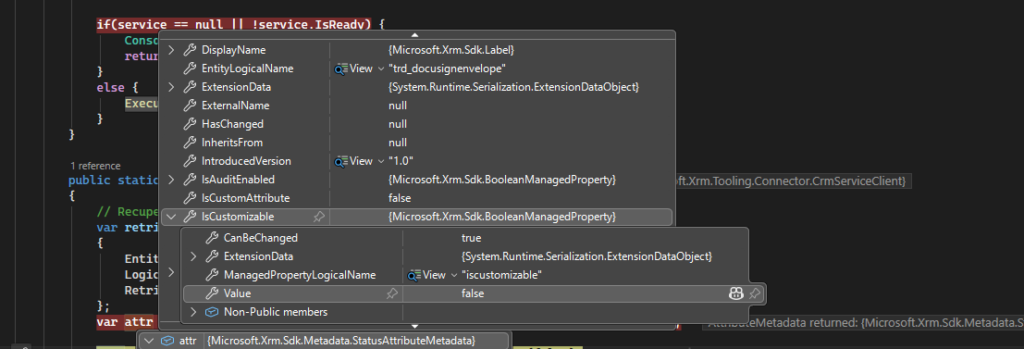
A quick note from testing : setting only IsCustomizable = new BooleanManagedProperty(false), sets Value=false. That alone already blocks customization on the target environment, even from the default solution. Adding CanBeChanged = false goes one level deeper.
What CanBeChanged=false really does, and this is the part almost nobody documents from experience : it protects the managed property from being changed by a different publisher. I tested both options on a fresh target environment. With CanBeChanged=true, exporting and deploying a version 2 of your solution that flips the Value property back to true ( Value=true) reopens the field(it becomes more permissive). With CanBeChanged=false, the same publisher can still update its own component across versions (that is by design, you must be able to evolve your own solution), but no other publisher can touch that managed property. Combined with Microsoft’s rule that only a solution from the same publisher prefix can update a managed component, this is what makes your ISV truly safe : your components are sealed against the outside world, while you keep control of your own versioning.
Putting it all together
You now know what encapsulation/protection is and how to apply it, but in order for the process to be effective you need to execute some steps in the right order.
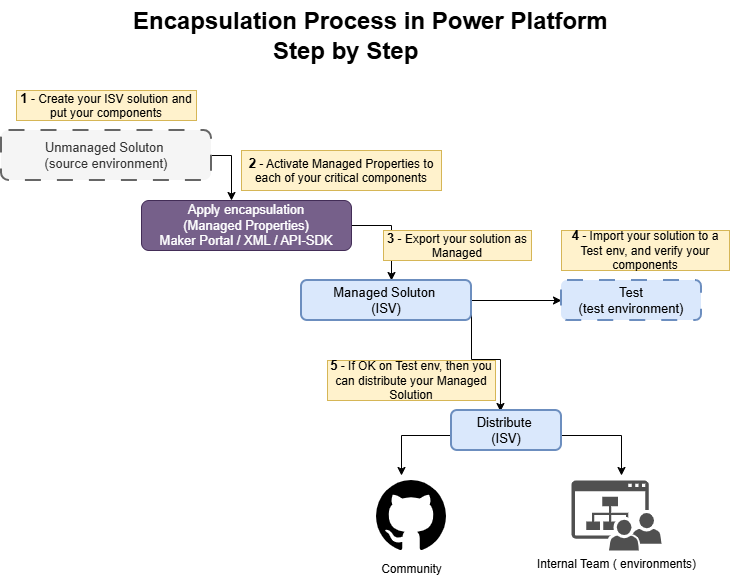
- First, create your unmanaged solution and add your components to it.
- Second, from the source environment where the solution is still unmanaged, apply your managed properties : IsCustomizable.Value=false via portal, or IsCustomizable.Value=false and CanBeChanged=false (via the API/SDK) for the components you really want to seal. Remember that not every component needs to be locked, only critical or sensible ones.
- Third, export your solution as managed.
- Fourth, and this one cost me a debugging session : test the installation on a brand new environment, never on one where you already installed the solution at least once. In an already-equipped environment you will never see the real behaviour applied, because of the update rule above. I got fooled by exactly this before I understood the rule.
- Last, distribute to the community, or deploy the managed solution to a higher environment if you work in a team.
A little moment of honesty
Managed properties only affect managed components. They do not enforce anything on the development environment where the component is still unmanaged (that is by design : you must be able to change everything on your own DEV). Their goal is to make sure that no other solution layer from another publisher, and no active customization, can be applied to the component once it is installed as managed on another organization.
If you write ISV solutions, keep in mind that managed properties do not provide digital rights management (DRM), nor any way to license your solution or control who installs it, unlike a real ISV product sold on AppSource.
And as powerful as it is, encapsulation via managed properties is not the ultimate protection. Three limits worth naming : first, it does not protect your plugin steps from being deactivated, so if a step is the core of your functionality, you should protect it separately. Second, it does not stop users from registering their own steps or handlers on your tables to run their code before or after yours. Third, it does not cover dependency protection in every case : if your plugin or JavaScript logic depends on a field, managed properties alone will not always prevent that field from being removed.
These other protections need different encapsulation techniques.
But rest assured, they are out of scope for this article and will be the subject of a follow-up : the second level of encapsulation.
Let me reassure you again : Managed Properties is the closest thing we have to solid protection against wrongdoing and unauthorized customization. There is just one more particularity you must know before implementing it.
When you apply encapsulation via managed properties and ship your solution as managed, at some point you will want to release a new version with new features. Because your components are protected, there are rules you must respect to update them.
You can update a protected managed component only if your update comes from the same publisher (same prefix, same publisher record). This guarantees that only you, the original publisher, can change it, and nobody else. Microsoft makes sure no unmanaged solution can be associated with a publisher already used to install a managed solution. A pretty good feature for an ISV author, right ?
- And here is the rule that cost me a very long debugging session : every update of your managed solution will be ignored if it is bringing any change that makes a managed property more restrictive than the version already installed. Managed property update only allows for the relaxation of existing restrictions. That is exactly why, early on, my target environment seemed to ignore the lock, it already had an earlier, less restrictive version installed. In a brand new environment, everything applied correctly. So always validate managed properties on a fresh install, never on an environment that is already equipped with a previous version of your solution.
- The takeaway for an ISV : set your managed properties correctly from version 1.0, and validate them on a fresh install. Going back to tighten them on an already-equipped environment is not possible without a full uninstall.
Conclusion
Managed Properties are one layer of encapsulation/immutability, and the most accessible one. They turn a managed solution from “managed” into truly “locked”, as long as you understand the IsCustomizable/Value vs CanBeChanged distinction, and set them right from version 1.0 and validate them on a fresh install (brand new environment). IsCustomizable/Value seals the component; CanBeChanged seals the property itself against other publishers; and only the API/SDK lets you reach that second level. But these two levels are not the whole story : protecting plugin steps, preventing others attaching events on your tables, and enforcing dependencies all need other techniques. That second level of encapsulation is exactly what I will cover in the follow-up. Until then : make your solutions’ components easy to use, and hard to misuse.