Dynamics 365 & Docusign Semi-full/full custom integration
P1 /3: Business implications & Architectural Overview
Most Dynamics projects at one point will need Electronic signatures features to help businesses sign contracts or some type of proposal documents. There exist several solutions available on the market place that offer “electronics signatures”, but the list gett shorter when looking for those ISV solution which are MS/EU compliant that can be integrated with the D365 CE/Power platform ( not talking about corporate email signature or standard D365 FO electronic signature). And one of the most known MS/EU compliant ISV solution is Docusign for Dynamics.
If you go to App source / Marketplace you will find the standard ISV Docusign for Dynamics and be able to integrate on a standard way, by buying a license and installing on your environment. But one could ask, where is the problem then ? Glad you ask. We are not here to talk about implementation, at least not on this first part. This is a 3 part article series.
So, going back to our train of thought, let me be honest, I heard so many people sharing their experience integrating DocuSign with Dynamics in the standard way, but I doubt their customers were happy with the solution. Docusign for Dynamics in a standard way does not satisfy not even 80% of functional requirements nor technical ones like security requirements literally speaking. Any serious company wouldn’t let their contractual documents being created on Sharepoint where the security model is archaic when integrated with D365. Oh! What about Notes ? where or the last one gets picked, or all documents present on the Note will be sent to the client, even though they are not documents to be signed ? Good luck.
If by this time you didn’t get the issues of standard Docusign integration let me paint a picture of the the business implications of Signing electronic documents. Here a some functionalities that is difficult if not, impossible to to have on standard way
More specific stuffs
Those are some of the reasons which may make you realize the Docusign standard integration may not work for your project requirements. It can be quite rare, and to my defense, this particular project had quite remarkable demands about Electronic signature. So take these reasons, add yours, and you should come to the conclusion that OOB ISV Docusign integration is not the right fit for your project.
Before continuing further, let me thank Mathis Michel and Allan De Castro who started challenging OOB Docusign and welcomed me onboard on this crazy Docusign adventure.
So, DS ISV OOB is not the right fit, so what to do next ?
Well, you have two main options, in fact three:
- Looking for another ISV provider
- Stick with Docusign( DS) , but :
- Implement a semi-full integration : OOB + custom integration
- Implement a full custom integration. None of OOB features : full custom integration
I hope at this point, I have already convinced you aside from Adobe Acrobat Sign that Docusign is the most mature solution if you are on the Microsoft ecosystem for this feature compared to others on what is capable of related to OOB features. Since we are talking about Docusign, let’s explore the two options left, semi-full and full custom integration.
The difference between Semi-full and full custom integration lies in smaller details. If you use a little bit of Docusign ISV OOB functionalities it is a semi-full custom integration even though the ISV OOB feature used is small. And if you use none OOB ISV feature, then it is a full custom integration.
To make more precise, lets consider Docusign OOB ISV features are :
If you use one of the features above, even the most simple one like ISV OOB User creation/synchronization on D365 as I did on my project but all others were done via Docusign API Integration, then it is no longer full custom integration. It is semi-full. Enough about the distinction between the two, since this distinction is not visible on architectural level, only on implementation level.
If you are an architect you may want to get a high level view of how things will work/look like to present to the client or to impose guide lines for implementation to tech lead/developers.
Here is what Semi-full or Full custom integration architecture looks like. Note that some details may change depending on your project’s specific needs.
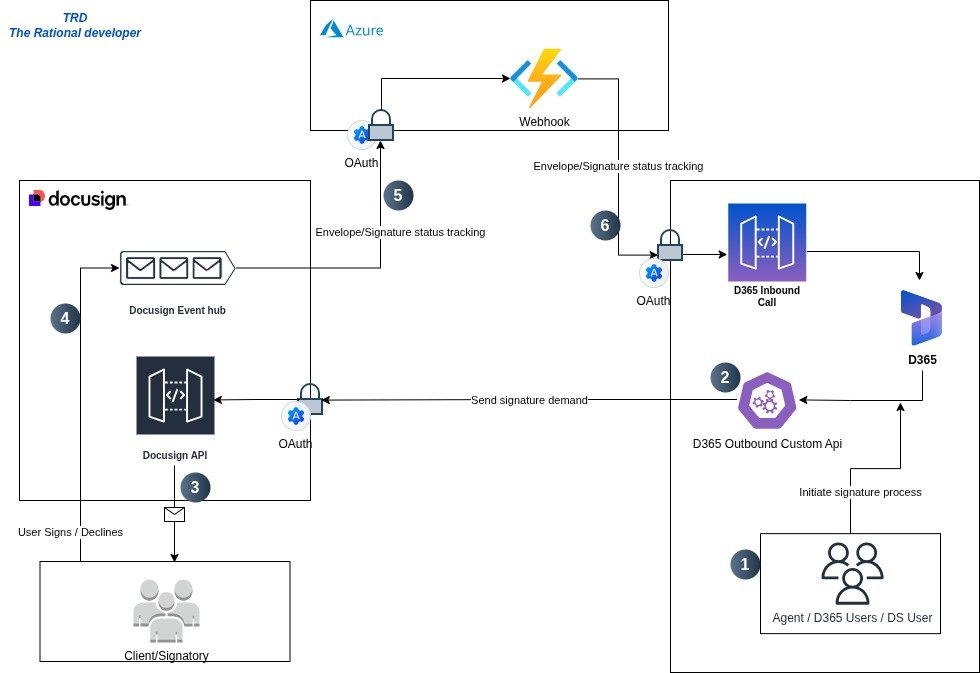
Fig 1 : Architectural overview of D365 & Docusign full custom integration
Before deep diving into details of what is going on, it is important to establish common ground, on some terms used in the docusign community.
DS product/community common terms
- Envelope : A package that contains complete data of what constitutes a demand for electronic signature. It contains Documents to be signed, the recipient(s) that need to sign the documents, Email subject and Email body, all this the user receives by email, but on the docusign side it is called an Envelope.
- Recipient/Client : The person to whom the signature is demanded from. The person that needs to sign, or the Signatory or simply the client.
- Envelope Status : Are events that allow to track at which stage the Envelope/Signature is at. Is it signed yet ? Is it declined ? Is it on Draft ? Is it Sent ?
- Docusign Event hub : When a user signs or declines an envelope, docusign is notified, and this event goes to the docusign event hub, to be dispatched.
Now that we know specific terms used in the DS community, we can deep dive on what is going on architecturally.
- All signature processes start from an Agent → D365 users which are at the same time docusign users. Those users usually are customer service, sales or marketing team members. They initiate a signature demand from D365 by triggering some type of event from a button.
- When an event is triggered from a button ( it triggers an Outbound Custom Api in our case). This Outbound call interact with docusign API by creating an envelope with the necessary informations( recipients, documents etc)
- When Docusign API receives this call, it gets the newly created envelope, identifies the signatory and sends it by email. And the recipient receives an email notification with a link to the envelope that needs to be signed. At this time docusign can skip step 4, and notify directly the Docusign Event hub, saying that an envelope was sent.
- At this stage, the user has received an email, when clicking on the link, he has two options, Sign or Declines. Either action triggers a Docusign event hub with the message saying an envelope was signed or an envelope was declined.
- The Docusign Event hub takes the message and sends the message with all envelope information and sends it to the Webhook. The Webhook URL/Endpoint must be registered on the Docusign environment on the Docusign event hub.
- The Webhook interprets the message and writes directly to D365
Note that on each side there is a modern authentication/authorization in place with OAuth in order to maintain robust security between the three system’s exchanges. We will explore more on this topic in part 2.
The implications of semi-full/full custom integration is a subject we will explore in detail in the second part, which will be implementation.
What we have seen so far, is quite enough to give you the overview and ideas on how to present the idea to clients, estimate the workload and delegate the implementation work that needs to be done to the dev team.
To summarize, on this part we have seen the business implications of electronic signature, the limitations of Docusign OOB ISV and we also have seen other alternatives like semi-full and full custom integration between D365 and DS ( DocuSign).
We finally saw the overview of the architecture to be put in place in those situations, and learned about the most common terms used on Docusign product/community which is very important when we want to do Integration with the DS API.
Adilson .C